
Blogs
Countertop or Wireless Payment Terminal? How to Choose the Right Workflow

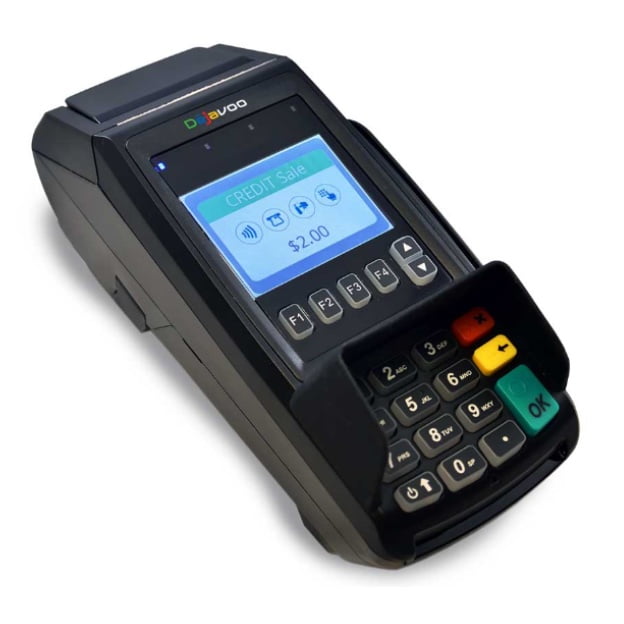
Quick answer: Dejavoo Z8 is primarily a countertop terminal, while Dejavoo Z9 is designed for mobile and wireless payment workflows. If the device will stay beside the register, Z8 is the more natural fit. If staff need to move the terminal around a restaurant, service area, or event, Z9 is the better starting point.
Dejavoo Z8 vs Z9 at a glance
| Area | Dejavoo Z8 | Dejavoo Z9 |
|---|---|---|
| Form factor | Countertop | Wireless/mobile |
| Typical use | Fixed checkout | Pay-at-table, mobile merchant, flexible checkout |
| Connectivity | Depends on configured Z8 model | Official Z9 material lists Wi-Fi and 4G/3G configurations |
| Customer movement | Customer comes to terminal | Terminal can go to customer |
When Dejavoo Z8 makes more sense
The Dejavoo Z8 is best considered as a fixed countertop payment terminal. It can suit retailers, offices, salons, service counters and restaurants where payment occurs at a stable register location.
A fixed device is easier to keep powered, physically secured and connected to a known network. It also reduces battery-management issues for employees.
When Dejavoo Z9 makes more sense
The Dejavoo Z9 is built for wireless operation. Dejavoo’s official Z9 material describes 4G/3G GPRS and Wi-Fi configurations, a touchscreen, contactless support and electronic receipt options.
That makes Z9 a better candidate for pay-at-table restaurant service, mobile merchants, curbside transactions, events or any business where the terminal needs to move with the employee.
Connectivity should be planned before purchase
Do not buy a wireless terminal simply because it sounds more flexible. Ask where the device will actually be used. Wi-Fi-only deployment may be adequate inside a restaurant with strong coverage. Cellular capability is more useful for mobile service or locations where Wi-Fi is unreliable.
For a fixed counter, Ethernet or another stable wired method may be preferable when supported by the selected configuration.
Receipt workflow
Wireless terminals may support printed or electronic receipt workflows depending on the exact hardware and processor application. Dejavoo’s Z9 materials reference electronic receipts through email or SMS in supported environments.
Merchants should confirm how receipts work with their processor configuration before ordering, especially if customers routinely require paper copies.
Restaurant use
Z9 naturally fits tableside payment because staff can bring the terminal to the customer. Z8 is more appropriate for a front counter, takeout station or cashier position where the device remains fixed.
Restaurants choosing a full POS ecosystem should also review JaimePOS restaurant POS systems rather than evaluating the payment terminal alone.
Retail and service use
A retail store with one checkout counter usually benefits from the simplicity of a fixed device. A showroom, salon, repair shop or mobile service business may prefer the flexibility of a wireless terminal.
Processor compatibility is critical
Payment terminals are boarded to specific processing platforms. A device should not be purchased until you know it can be supported by the intended merchant account, payment application and encryption environment.
Review JaimePOS payment processing and credit card terminal options if you need help choosing a complete setup.
Questions to ask before choosing
- Will the terminal remain fixed or move around?
- Is Wi-Fi sufficient, or is cellular connectivity required?
- How will receipts be delivered?
- Does the merchant processor support the exact model?
- Will the device need a charging base or docking station?
- How many terminals are needed at peak time?
Shop products mentioned in this guide
Current JaimePOS pricing and availability are shown below. Product configurations can vary, so review the product page before ordering.


Official resources
Payment applications, network options and processor support vary by configuration. Confirm compatibility before purchase or activation.


