
Blogs
Self-Ordering Kiosks for Restaurants: Clover Kiosk Deployment Guide

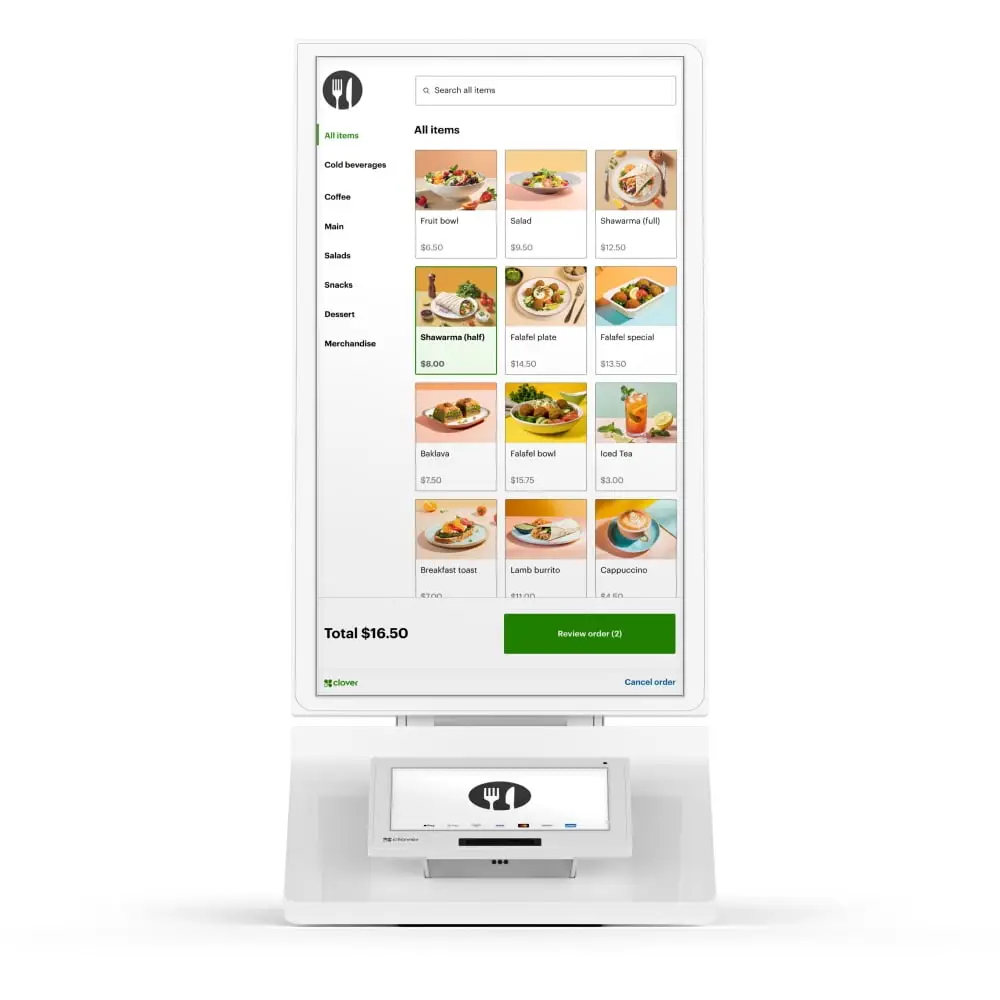
Quick answer: A self-ordering kiosk makes sense when a restaurant has enough order volume, menu structure and floor space to let guests place orders without tying up a cashier. It is most useful when the kiosk is connected cleanly to the same POS menu, payment system and kitchen workflow as the rest of the restaurant.
What a restaurant kiosk should solve
A kiosk should have a clear operational purpose. Common goals include reducing the queue at the counter, giving guests more time to browse the menu, moving repetitive order entry away from staff, and routing kiosk orders directly into the existing kitchen workflow.
If the kiosk only creates another disconnected order channel, it can make operations harder rather than easier.
Clover Kiosk hardware
The Clover Kiosk is an all-in-one self-ordering system. Clover’s current product information lists a 24-inch ordering touchscreen, an 8-inch payment touchscreen, a built-in receipt printer, and Wi-Fi, Ethernet and LTE connectivity. It supports countertop, wall-mount and floor-stand deployment options.
Restaurants comparing older or alternative kiosk configurations can also review the Clover BentoBox Kiosk and other JaimePOS kiosk products, but compatibility and software requirements should be verified for the exact configuration.
1. Start with menu readiness
A kiosk works best when the menu is easy for customers to understand without employee guidance. Before deployment, review:
- item names and descriptions,
- modifier groups,
- required selections,
- upsell choices,
- out-of-stock handling,
- menu images, and
- pricing consistency across all ordering channels.
If the menu requires staff to explain every order, a kiosk will not solve the underlying complexity.
2. Decide where kiosk orders go
Clover states that Kiosk orders can flow into the restaurant’s Clover POS environment and then appear on a Kitchen Display System or print to a kitchen printer. That routing should be tested before opening the kiosk to customers.
A restaurant using Clover KDS should decide whether kiosk orders appear in the same queue as counter and online orders, and whether separate kitchen stations need item-level routing.
3. Plan physical placement
Kiosk location affects adoption. It should be visible before customers join the cashier line, but it should not create a new bottleneck. Consider power, Ethernet access, Wi-Fi coverage, accessibility, queue space, and whether the screen will be exposed to direct sunlight or heavy traffic.
Clover lists wall, floor and countertop options. The best choice depends on the restaurant layout and accessibility requirements.
4. Think through payment and receipt behavior
According to Clover, the current Kiosk accepts chip, swipe, contactless and debit PIN payments and includes a built-in printer. Restaurants should decide whether paper receipts are printed by default, offered as an option, or supplemented with digital receipts.
Merchant processing and software plan requirements should be confirmed before purchase. The hardware cannot be evaluated separately from the payment account and POS configuration.
5. Staff still need a kiosk process
Self-ordering does not eliminate staff involvement. Employees need procedures for:
- helping first-time users,
- handling declined payments,
- correcting orders,
- issuing refunds,
- restocking receipt paper,
- cleaning the screen, and
- switching customers to a staffed register when needed.
When a kiosk may not be the right choice
A kiosk may add unnecessary cost when transaction volume is low, floor space is very limited, the menu changes constantly, customers expect high-touch service, or the kitchen cannot absorb additional ordering channels. In those cases, a faster counter POS or handheld ordering system may solve the real problem more effectively.
Kiosk vs additional cashier station
An extra cashier station adds labor capacity. A kiosk shifts order entry to the guest. The right decision depends on whether the bottleneck is order entry, payment, kitchen production, or staffing. A restaurant that already has slow kitchen throughput should not assume that faster ordering alone will improve service.
Related JaimePOS products
For full restaurant planning, see JaimePOS Restaurant POS Systems.
Shop products mentioned in this guide
Current JaimePOS pricing and availability are shown below. Product configurations can vary, so review the product page before ordering.

Clover Kiosk
In the box:
Payments: Accepts contactless, chip, swipe, and debit PIN payments
Screens: 24" order touch screen and 8" payment touch screen
Receipt printer: Built-in thermal dot receipt printer
Security: Clover Security end-to-end encryption
Connectivity: Wi-Fi, ethernet, and LTE connectivity
Mount: Optional wall mount accessory and supports 100mm VESA mounts
*Free image menu programming, installation, and training

Official resources
Kiosk features, pricing, software plans and compatibility can change. Confirm the current merchant configuration and deployment requirements before purchase.


