
Blogs
Clover KDS Guide: When a Kitchen Display System Makes Sense

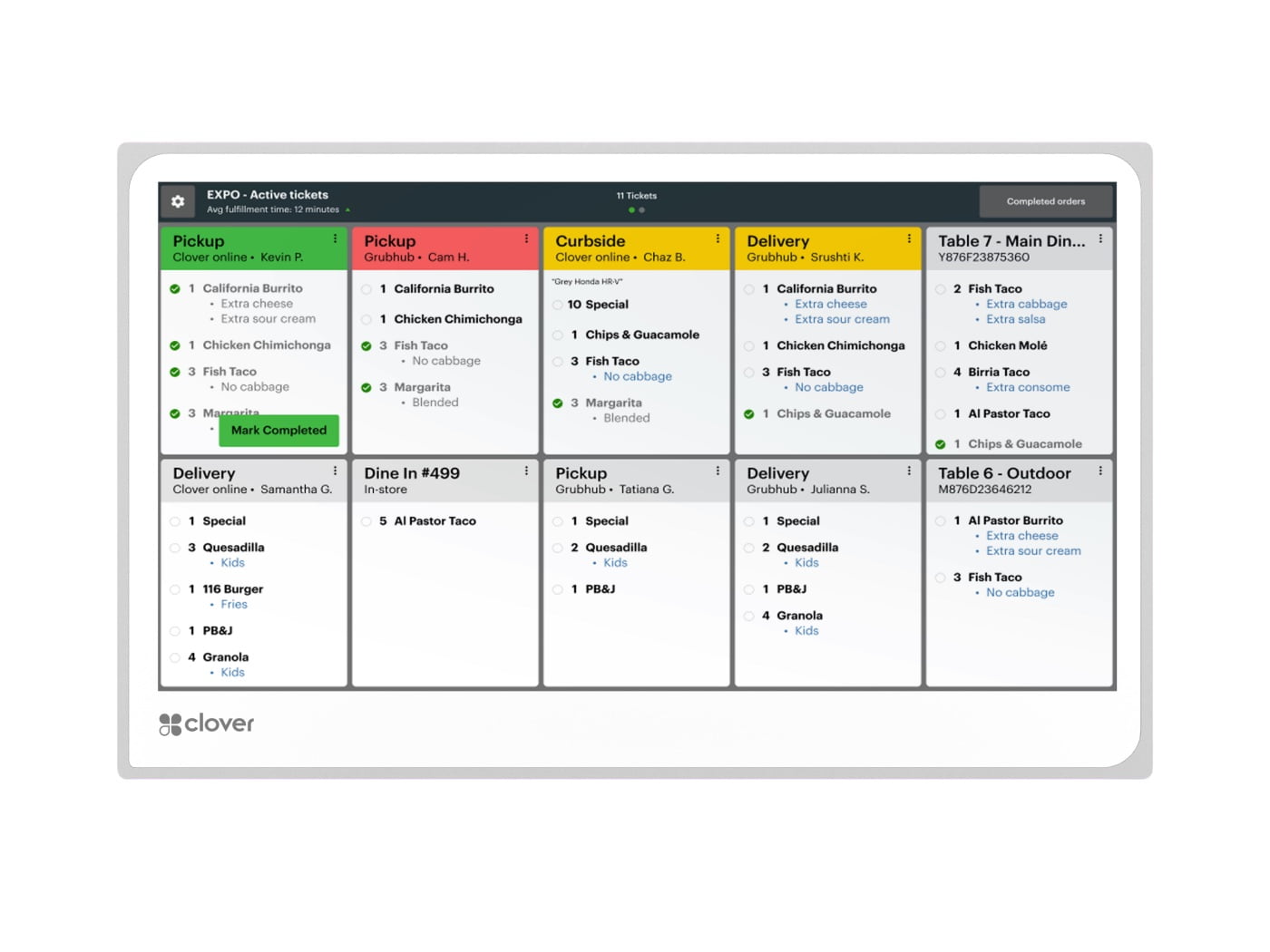
Quick answer: Clover KDS makes the most sense when a restaurant needs a digital kitchen workflow that keeps front-of-house, online and kitchen orders visible in one place. It can replace or supplement printed kitchen tickets, but it works best when routing rules, screen placement and staff responsibilities are planned before installation.
What Clover KDS is designed to do
The Clover Kitchen Display System is an employee-facing kitchen screen. Clover’s current documentation says KDS can consolidate orders, show ticket times and status, support item-level routing, provide prep-time reporting and print runner tickets to compatible network printers.
14-inch vs 24-inch KDS
Clover currently offers 14-inch and 24-inch KDS sizes. The smaller screen is useful where counter or wall space is limited. The 24-inch version is better suited to overhead placement or kitchens where several employees need to view the queue from a distance.
Both sizes can be part of the same restaurant workflow, but screen size should be chosen based on viewing distance and station purpose rather than simply buying the largest display.
When a KDS is better than paper tickets
A digital kitchen display can be useful when the restaurant wants:
- one queue for multiple order channels,
- real-time order status,
- less paper-ticket clutter,
- different items routed to different prep stations,
- clearer expo workflow, or
- ticket-time and fulfillment reporting.
Restaurants that rely on simple, low-volume ticket printing may not need a KDS. The right decision depends on order volume and kitchen complexity.
When printed tickets still help
A KDS does not make printers obsolete in every restaurant. Some kitchens keep a printer as a backup or use runner tickets. Clover states that KDS can print runner tickets to supported network printers.
For printed kitchen tickets, an impact printer such as the Star SP742 can be appropriate. Front-counter customer receipts usually use a thermal printer instead.
Plan item routing before installation
Routing is the heart of a KDS deployment. Decide which items go to grill, fry, bar, dessert, prep, and expo. If every screen shows every item, employees may spend more time filtering information than preparing orders.
A good setup should make each station responsible for a clear part of the ticket while expo can see the broader order.
Think about online orders too
Clover describes KDS as a way to bring on-premise and off-premise orders into the kitchen workflow. Restaurants should test how online, third-party and kiosk orders appear alongside cashier or tableside orders.
If the restaurant also uses a Clover Kiosk, verify that self-service orders route to the correct kitchen station and do not create a separate queue employees overlook.
Mounting and control options
Placement affects usability. A screen at eye level may be easy to touch, while an overhead display can be easier for a team to see but harder to reach. JaimePOS carries Clover KDS wall-mount and countertop stand options.
For overhead or non-touch workflows, the Clover KDS Bump Bar can provide physical controls for managing orders.
Staff training matters
Employees should know how to acknowledge, bump, recall and complete orders, how color/status indicators work, and what to do if a screen or network connection fails. A KDS rollout should include practice during a low-volume period before the busiest service.
When KDS may not be necessary
A small coffee shop with a short menu and one prep station may be perfectly efficient with a printer. A KDS becomes more valuable as order volume, menu complexity, channels and kitchen stations increase.
A practical deployment pattern
A counter-service restaurant might use Clover Station Duo at the front counter, one 14-inch KDS in the kitchen, and a thermal receipt printer at checkout. A larger kitchen might add a second KDS for expo or a 24-inch overhead display.
For a broader setup, see JaimePOS Restaurant POS Systems and the Restaurant POS Hardware Checklist.
Official Clover KDS setup video
Video source: Clover.
Shop products mentioned in this guide
Current JaimePOS pricing and availability are shown below. Product configurations can vary, so review the product page before ordering.


Official resources
KDS features, plan requirements, compatibility and pricing can change. Confirm the current Clover configuration before purchase or deployment.


